Untitled
Workflows, Best Practice guidance, Tips and Tricks to extract the best from Hammer Missions
Folder Structures for Flight Missions and Projects
In this guide we will explain a simple, practical approach to organising your flight missions and projects to facilitate your team being able to find, share and reuse data quickly. The structure we recommend you use, is one that mirrors how your Organisation operates e.g. (company → region → site → building → mission). Once its outlined you should find that it works equally well for mission planning and project folders.
Why a logical folder structure matters
Having a predictable, consistent folder layout saves time and reduces mistakes. When folders follow a clear hierarchy you get these benefits:
- Faster search and navigation — know exactly where to look for a mission or asset.
- Safer sharing — share the right level (company, site, or single mission) without exposing unrelated data.
- Better traceability — link missions to specific buildings, facades or roofs for reports and audits.
- Scalability — the same pattern works for a small site or a multinational operation.
Recommended folder hierarchy
Use a top-down structure that reflects organisational boundaries. A simple, effective hierarchy could be something like:
- Company (root folder)
- Region / State / Country
- City or Site
- Building (if relevant)
- Flight missions (one folder per mission / facade / roof)
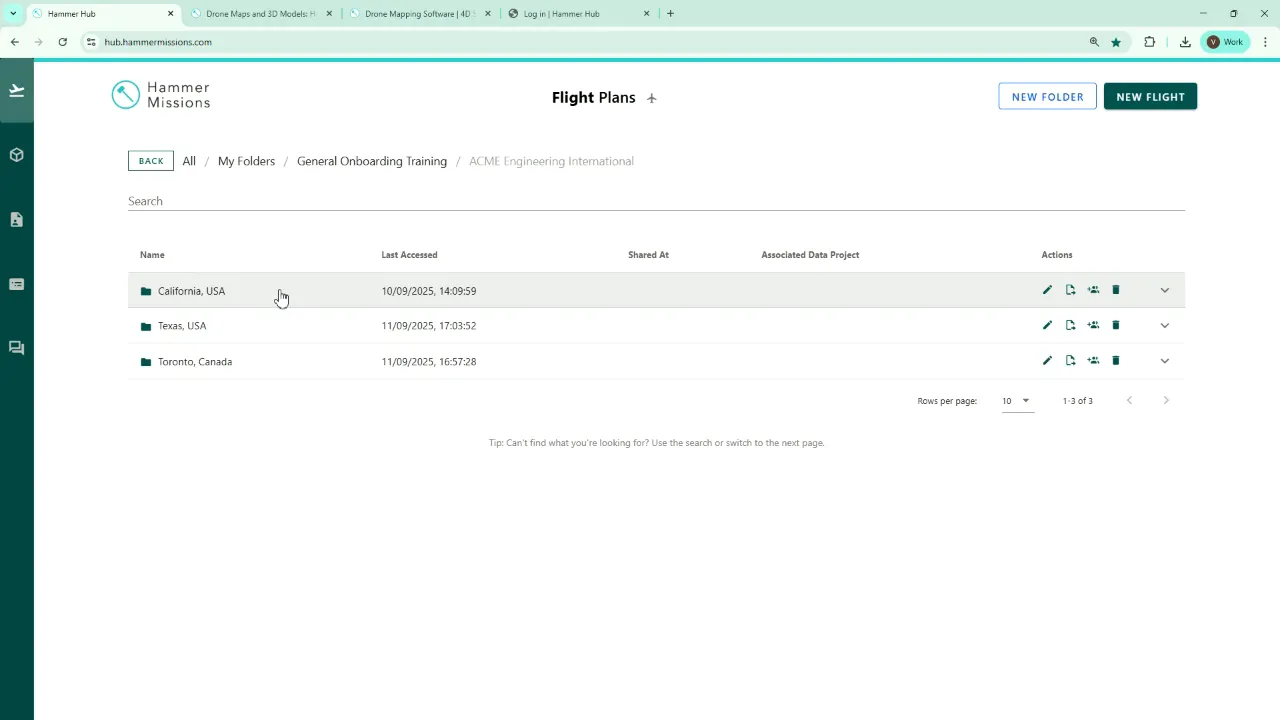
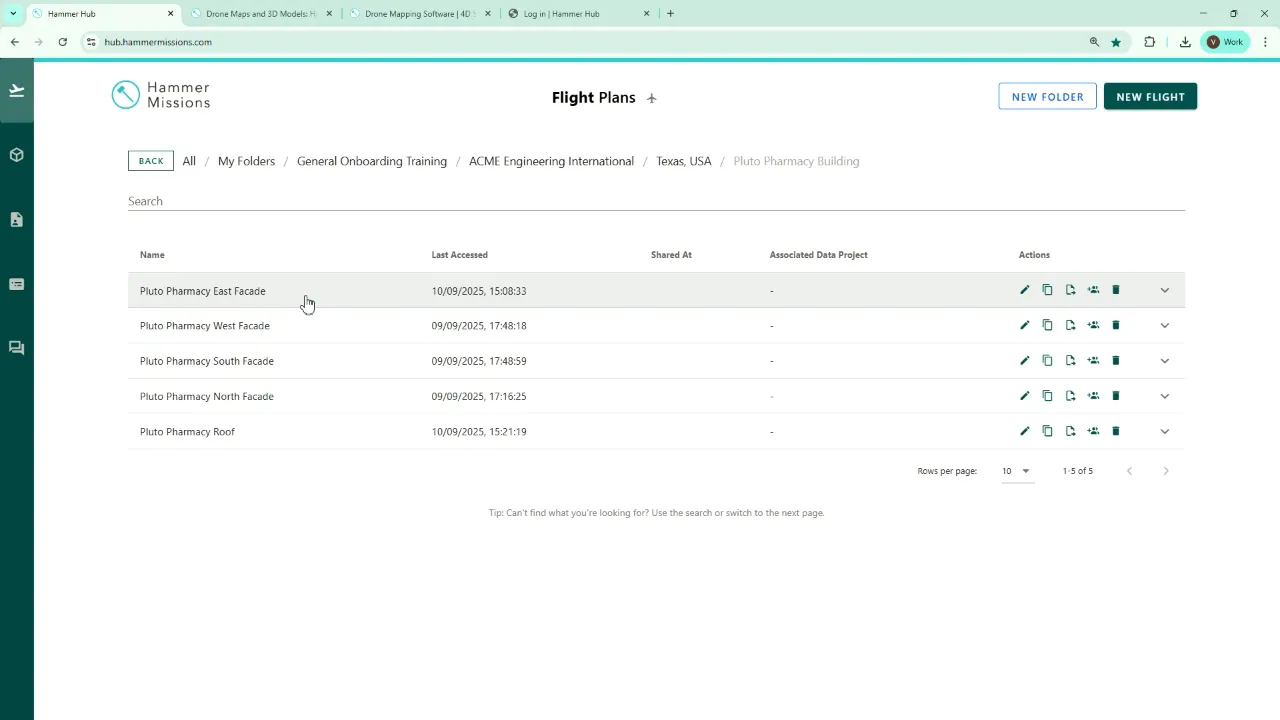
Example: Acme Engineering International → Texas → Houston → Pluto Pharmacy Building → Facade North
Quick walkthrough: building the structure
Here’s a short step-by-step example based on the approach we typically use ourselves on the Hammer Missions platform.
- Create a root folder for the organisation — e.g. Acme Engineering International.
- Add subfolders for each region or state where the organisation operates.
- Add city- or site-level folders under each region, or skip this level if it isn’t needed.
- Create building folders where inspections or missions are required — e.g. Pluto Pharmacy Building.
- Create mission folders inside the building for each operation — e.g. Facade West, Roof Inspection.
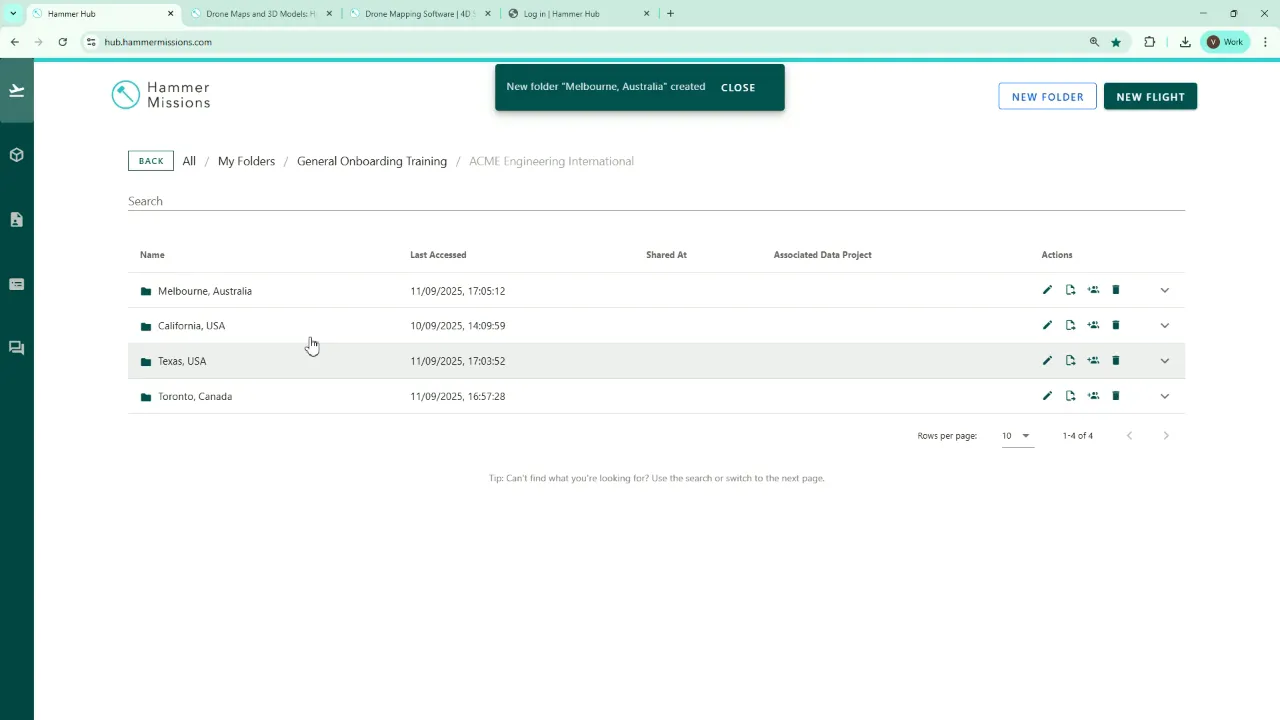
“And we now have all of the sites where this company is operating.” This is the moment the structure becomes useful: every mission you add now has a contextual home, making it easier to manage and share.
Practical tips and naming conventions
- Keep names consistent: Use a standard format such as \[Company\] → \[Country-State\] → \[City-Site\] → \[Building\] → \[Mission\_Type\_Date\].
- Be specific but concise: “Pluto Pharmacy — Roof — 2025-09-01” is clearer than “Roof inspection”.
- Use dates in ISO format (YYYY-MM-DD): this ensures folders sort chronologically.
- Limit depth: Too many nested levels can be cumbersome. Stop where the next level wouldn’t add searchable context.
- Permissions and sharing: Apply access controls at the appropriate level — company-wide for admin teams, site-level for local crews, mission-level for external contractors.
- Reuse the pattern for projects: Projects often mirror missions. Use the same hierarchy and naming rules to keep everything aligned.
Common folder examples
- Acme Engineering International/
- Texas/
- Houston — Pluto Pharmacy Building/
- Facade\_North\_2025-06-10
- Facade\_South\_2025-06-11
- Roof\_2025-06-12
- Victoria (Australia)/
Keeping it usable over time
To keep the system healthy:
- Audit folders periodically — archive or consolidate old missions.
- Consider documenting the naming convention in a short document and share it with your colleagues, so that everyone follows the same approach
- You can also consider training new users during their onboarding process, on where to save their missions and how to share them safely.
"This is just a quick introduction to show you how you can structure your data and folders..."
Conclusion
A clear, consistent folder structure pays dividends in speed, safety and clarity. By organising mission planning and projects with the same logic — company → region → site → building → mission — you make data easier to find, share and manage. Start small, pick a naming convention, and apply it consistently across the platform.
➡️Next Topic
Mission Planning
⬅️ Previous Topic
Adding & Removing Team Members